
Configuring Action Buttons
When creating mobile push notifications, you can add action buttons.
- iOS supports up to 4 buttons.
- Android supports up to 3 buttons.
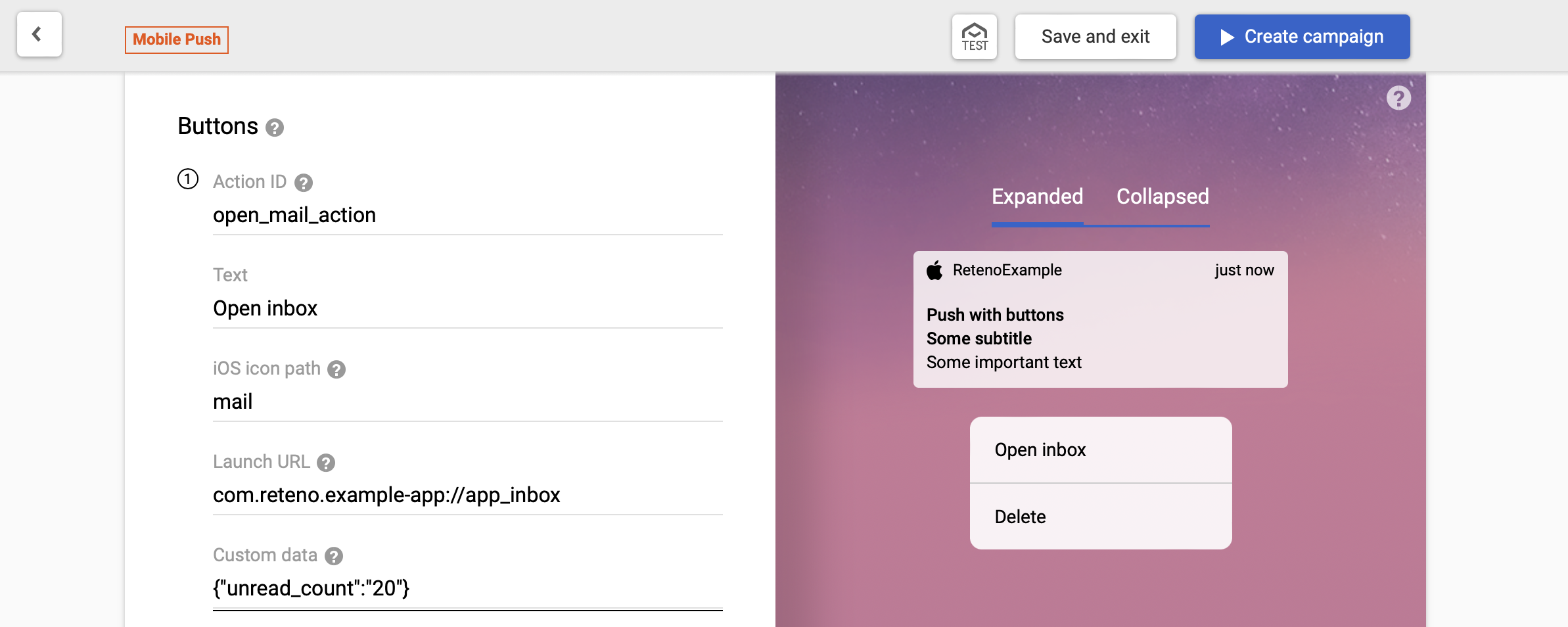
Use unique Action ID values for different buttons.
| Parameter | Notes |
|---|---|
| Action ID | Unique button action identifier |
| Text | Text shown on the button |
| iOS icon path | Available on iOS 15+. Name of image from app bundle |
| Launch URL | URL/deeplink to open |
| Custom data | Additional JSON payload |
Handle Action Button Click
iOS
Enable handler:
await this.reteno.setNotificationActionHandler({ emitEvent: true });
// or equivalently:
await this.reteno.setNotificationActionHandler({ enabled: true, emitEvent: true });
Any other value (false, null, true, { enabled: true } without emitEvent) clears the handler.
Subscribe:
The plugin delivers the event through document.addEventListener('reteno-push-button-clicked', ...), so the listener receives a DOM CustomEvent whose detail field matches RetenoPushButtonClickedPayload:
const onPushButtonClicked = (event: any) => {
  const detail = event?.detail ?? event;
  console.log('reteno-push-button-clicked:', detail);
  // detail.actionId   — unique button action identifier
  // detail.link       — URL/deeplink associated with the button (may be null)
  // detail.customData — additional JSON from the button (object, or raw string on Android)
  // detail.userInfo   — original notification payload
};

this.reteno.setOnRetenoPushButtonClickedListener(onPushButtonClicked);

// later
this.reteno.removeOnRetenoPushButtonClickedListener(onPushButtonClicked);
Disable:
await this.reteno.setNotificationActionHandler(false);Android
setNotificationActionHandler(...) is no-op on Android. Action button clicks are detected automatically.